Architecture
This page describes the technical components of SIAAS Personal. For a practical introduction to projects, assistants and everyday tasks, start with Overview.
Component overview
A project groups assistants, each with its own Knowledge and chat. The diagram connects questions, documents and websites to the available modules and responses. Standard modules run locally; website reading contacts the addresses you choose. Optional Beta modules are shown separately. The diagram describes module roles, not a fixed execution order. The original image and accessible text description are available below it.
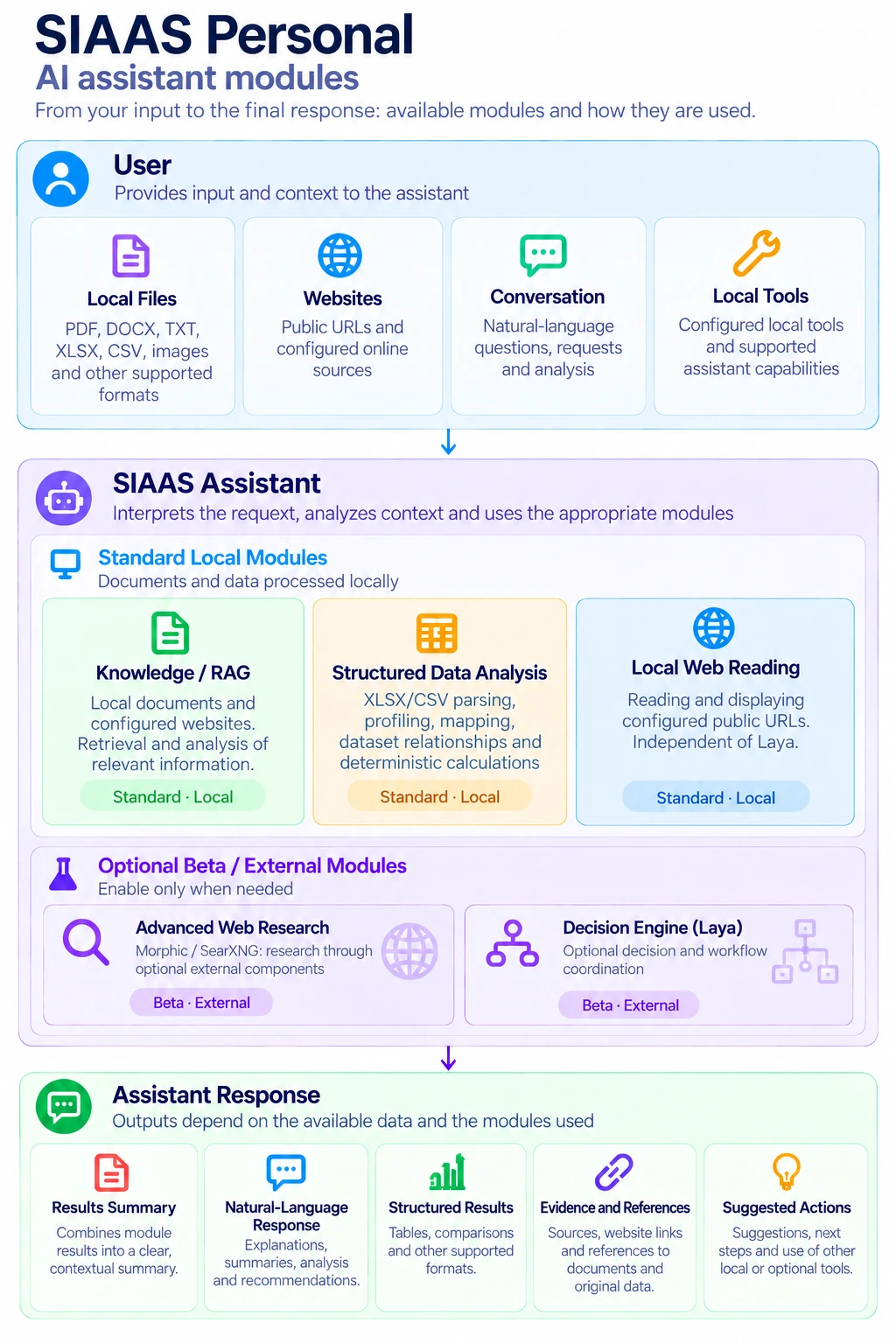
Open the infographic at full resolution
Knowledge accepts PDF, DOCX, TXT, Markdown, XLSX and CSV. Images and other formats depend on explicitly supported capabilities; this diagram does not announce general image ingestion or OCR.
Read the accessible text version
User
- Local Files: PDF, DOCX, TXT, XLSX, CSV, images and other supported formats, subject to the version and capabilities above.
- Websites: Public URLs and configured online sources.
- Conversation: Natural-language questions, requests and analysis.
- Local Tools: Configured local tools and supported assistant capabilities.
SIAAS Assistant
Interprets the request, analyzes the available context and uses the appropriate modules.
Standard Local Modules
- Knowledge / RAG: Local documents and configured websites; retrieval and analysis of relevant information.
- Structured Data Analysis: XLSX/CSV parsing, profiling, confirmed mapping, dataset relationships and deterministic calculations.
- Local Web Reading: Reading and displaying extracted content from configured public URLs. Independent of Laya; not advanced web research. Requests contact the selected websites. Sign-in and JavaScript-only pages may not be readable.
Optional Beta / External Modules
- Advanced Web Research — Beta / External: Optional Morphic adapter and separate SearXNG search service. Requires Docker and explicit global and assistant opt-in.
- Decision Engine (Laya) — Beta / External: Optional decision and workflow coordination through Advanced Reasoning. Requires Docker and explicit opt-in. Standard website reading does not require it.
Assistant Response
- Results Summary: A clear, contextual summary of the available results.
- Natural-Language Response: Explanations, summaries, analysis and recommendations.
- Structured Results: Supported tables, comparisons and report formats; chart rendering depends on the available result format.
- Evidence and References: Source files, websites, documents and original data references.
- Suggested Actions: Suggestions and next steps, not automatic permission to execute them.
Outputs depend on available data and the modules actually used. A response need not contain all five types. Explicit local-only requests skip websites and external discovery.
Desktop runtime
SIAAS Personal is a guest-only local desktop workspace. Electron starts the application-managed Node runtime and Next.js server on loopback. The renderer has no Node access. Local requests require the expected host, desktop session key and allowed origin.
SQLite stores projects, assistants, knowledge, conversations, embeddings and settings. Ollama runs local models. Standard agents and retrieval need no Docker or account. Installation, updates, model downloads and configured websites can require network access.
Optional advanced capabilities
Settings → Experimental Features stores two versioned, independent preferences: Advanced Reasoning (Beta) and Advanced Web Research (Beta), both off by default. They require Docker CLI, Compose v2 and an accessible Linux-container Engine 20.10+ on x64/arm64. The backend validates activation and every advanced request. Readiness and health are separate from saved preferences. Legacy settings migrate to unified sources without granting new Beta consent; inactive saved website URLs require confirmation.
The existing decision container provides optional reasoning. Web research reuses the local Node adapter and its Docker search service, preserving access to loopback-only Ollama. Lifecycle commands target only one feature; they do not remove volumes or unrelated containers. Without a ready optional service, local chat, retrieval and Selected Websites continue with available evidence and explicit limitations.
See Research for configuration, migration, privacy, failure states and the outstanding real-Docker validation phase. See Installation for the managed runtime pinned by each release and update/rollback behavior.
Unified source workflow
Every assistant can use local indexed documents and approved configured websites together, without Docker or agent-tool requirements. Local retrieval comes first; deterministic coverage and freshness requests decide website consultation. Pages are read on demand and not automatically imported. Optional Advanced Web Research requires both global and assistant switches plus Docker and service health; Advanced Reasoning is independent. See Sources and optional Beta research.
Local data layout
Your local workspace contains project records, assistants, conversations, document copies and retrieval data. It belongs to the operating-system profile.
Find your data
Open Settings → Documents on this PC to inspect the data directory and open it in your file manager. Packaged SIAAS Personal uses Electron's user-data directory. A directly started development server may use SIAAS_DATA_DIR or ~/.siaas.
Filesystem layout
- siaas.sqlite: authoritative records, conversations and embeddings.
- projects/<project-id>/assistants/<assistant-id>/documents/: managed document copies, one directory per document.
- sources.json: folder links and document metadata for an assistant.
- knowledge/index.json: rebuildable passages and indexing metadata.
Stable IDs keep directories unchanged when you rename projects or assistants. Connected original folders remain outside this managed structure.